


Getting Started with Percona PostgreSQL Operator
Neil Armitage
 Community
I’m a long term user of MySQL with both asynchronous replication and synchronous with PXC. For a while now this has been on Kubernetes with either Helm deployments or more recently operator deployments. I felt it was time to dip my toe into the world of PostgreSQL as it’s become more and more popular (or certainly appears to be).
My learning style has always been to jump right in a see what i can break so nowadays I normally build a repeatable throwaway Kubernetes setup with Kind where i can play and destroy quickly in a repeatable environment.
I have recently built a set of base kind stacks that I can reuse as i was constantly rebuilding stacks with slightly different configs so i wanted to start standardising them.
Full disclaimer I’ve used this setup on an Arm MacBook. I’m assuming it will work on Linux pretty much the same but for Windows I have no idea. I’ve not touched Windows in a long time but it should work them same.
Installing kind is pretty simple and will depend on your host O/S - full details are here
The scripts used below can be found in Github in the directory Percona-Operator
git clone https://github.com/statefulops/postgres-scripts.gitDeploy a base cluster with an object store
The first step is to deploy a multi-node Kind cluster with a way of simulating an S3 compatible object store (in this example using RustFS). Using something like RustFS ensure we are avoiding any cloud costs when testing backups and restores.
The quick and dangerous way is to run a script from Github
curl -fsSL https://raw.githubusercontent.com/statefulops/kind-scripts/main/s3/create-cluster.sh | bash -s -- v1.37.0 percona-pgThe safer way is to download the script, check it’s not doing anything harmfull and then execute it yourself
curl -fsSL https://raw.githubusercontent.com/statefulops/kind-scripts/main/s3/create-cluster.sh -o create-cluster.sh

less create-cluster.sh

chmod +x create-cluster.sh

./create-cluster.sh v1.37.0 percona-pg
This will deploy a Master node and 3 workers with zone labels, and a container running RustFS. Using Kubernetes 1.37. I tend to always use Zone labels even locally as it simulates multiple zone deployments.
kubectl get nodes -L topology.kubernetes.io/zoneNAME STATUS ROLES AGE VERSION ZONE
percona-pg-control-plane Ready control-plane 3m39s v1.37.0
percona-pg-worker Ready <none> 3m25s v1.37.0 AZ-A
percona-pg-worker2 Ready <none> 3m25s v1.37.0 AZ-B
percona-pg-worker3 Ready <none> 3m25s v1.37.0 AZ-Ckubectl get po -n rustfsNAME READY STATUS RESTARTS AGE
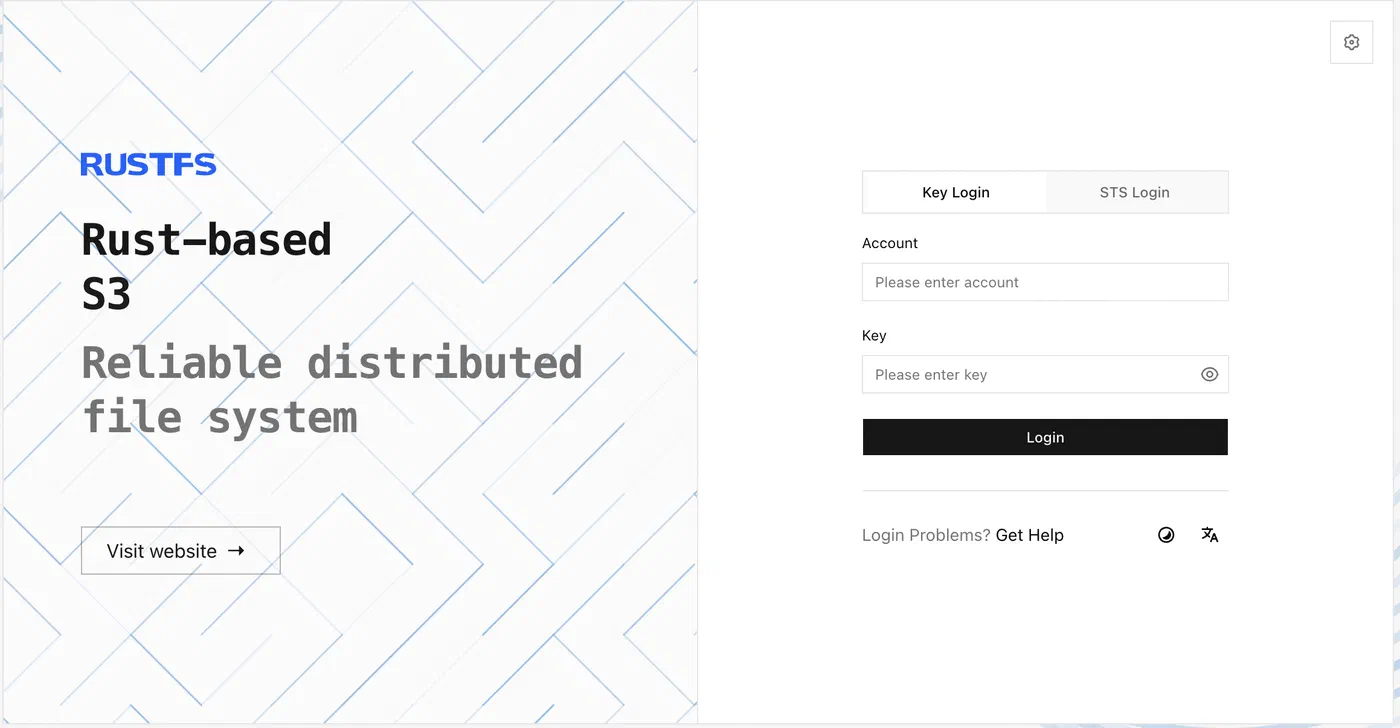
rustfs-574c7b89d7-5dl4d 1/1 Running 0 4m1sA nodeport is set automatically so the RustFS UI will be available on http://localhost:9001. The user is set to myadminuser and the script sets a random value for the secret password in a Kubernetes secret. To get the password run
kubectl get secret rustfs-admin-credentials -n rustfs -o jsonpath='{.data.secret-key}' | base64 -dUI on http://localhost:9001
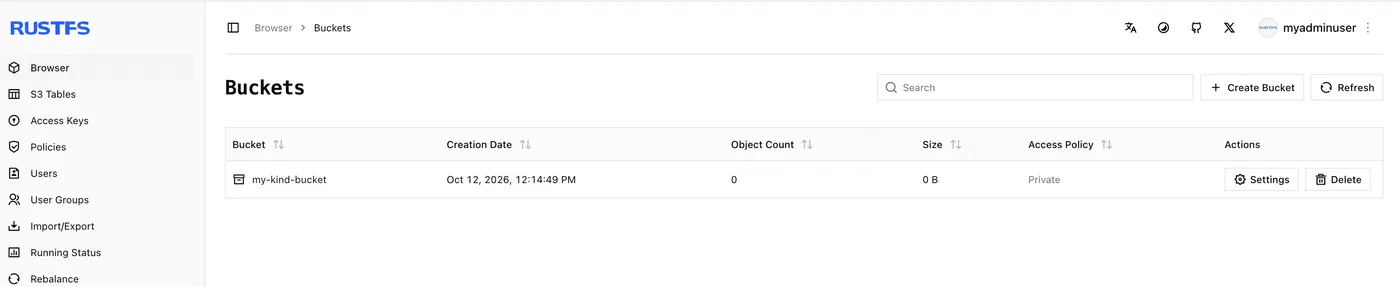
Standard AWS CLI commands work as well - make sure you run the make_bucket command is it is needed later.
export AWS_ACCESS_KEY_ID=myadminuser
export AWS_SECRET_ACCESS_KEY=$(kubectl get secret rustfs-admin-credentials -n rustfs -o jsonpath='{.data.secret-key}' | base64 -d)
export AWS_DEFAULT_REGION=us-east-1

aws --endpoint-url http://localhost:9000 s3 mb s3://my-kind-bucketmake_bucket: my-kind-bucketaws --endpoint-url http://localhost:9000 s3 ls2026-10-12 12:14:49 my-kind-bucketInstall the Percona PostgreSQL Operator 3.1.0
Add the Percona Helm repo:
helm repo add percona https://percona.github.io/percona-helm-charts/
helm repo update
Safety check — only ever run this against a local kind cluster: I might have learnt this lesson the hard way :)
CURRENT_CONTEXT=$(kubectl config current-context)
case "$CURRENT_CONTEXT" in
*kind*) echo "OK: using kind context '$CURRENT_CONTEXT'" ;;
*) echo "ABORT: context '$CURRENT_CONTEXT' is not a kind cluster"; exit 1 ;;
esac
Install the operator and switch to its namespace:
kubectl create namespace pg-operator
helm install ps-operator percona/pg-operator --namespace pg-operatorNAME: ps-operator
LAST DEPLOYED: Mon Oct 12 12:48:30 2026
NAMESPACE: pg-operator
STATUS: deployed
REVISION: 1
DESCRIPTION: Install complete
TEST SUITE: None
NOTES:
1. Percona Operator for PostgreSQL is deployed.
See if the operator Pod is running:
kubectl get pods -l app.kubernetes.io/name=pg-operator --namespace pg-operator
Check the operator logs if the Pod is not starting:
export POD=$(kubectl get pods -l app.kubernetes.io/name=pg-operator --namespace pg-operator --output name)
kubectl logs $POD --namespace=pg-operator
2. Deploy the database cluster from pg-db chart:
helm install my-db percona/pg-db --namespace=pg-operator
Read more in our documentation: https://docs.percona.com/percona-operator-for-postgresql/2.0/kubectl config set-context --current --namespace=pg-operatorCreate a Cluster and Connect to it
The sample deployment which comes with the operator repo is, in my view, too complex to start with so I’ve created some simple ones
Review cr-simple.yaml and check what it’s going to do, then apply it to the kind cluster. It will deploy a 3 Postgres pods and 3 PGBouncer pods.
kubectl apply -f cr-simple.yamlCheck the status and wait for it to become Ready
kubectl get perconapgclusterNAME ENDPOINT STATUS POSTGRES PGBOUNCER AGE
cluster1 cluster1-pgbouncer.pg-operator.svc ready 3 3 2m13sOnce is is ready check the pods are running ok, you should have something similar to this
kubectl get po -o wideNAME READY STATUS RES AGE IP NODE
cluster1-backup-24fx-jqd4c 0/1 Completed 0 41h 10.244.1.7 percona-pg-worker
cluster1-backup-xr9r-2ltht 0/1 Completed 0 41h 10.244.1.6 percona-pg-worker
cluster1-instance1-8nz4-0 6/6 Running 0 41h 10.244.3.8 percona-pg-worker3
cluster1-instance1-bzbc-0 6/6 Running 0 41h 10.244.1.8 percona-pg-worker
cluster1-instance1-mp4b-0 6/6 Running 0 18h 10.244.4.10 percona-pg-worker2
cluster1-pgbouncer-6744b67fcc-5djhn 2/2 Running 0 41h 10.244.1.4 percona-pg-worker
cluster1-pgbouncer-6744b67fcc-rpngj 2/2 Running 0 41h 10.244.4.6 percona-pg-worker2
cluster1-pgbouncer-6744b67fcc-zx75p 2/2 Running 0 41h 10.244.3.4 percona-pg-worker3
cluster1-repo-host-0 2/2 Running 0 41h 10.244.3.7 percona-pg-worker3
ps-operator-pg-operator-8575f47647-rbr77 1/1 Running 0 41h 10.244.1.2 percona-pg-workerTo connect to the cluster get the generated credentials from the Kubernetes secret
PGBOUNCER_URI=$(kubectl get secret cluster1-pguser-cluster1 -o jsonpath='{.data.pgbouncer-uri}' | base64 --decode)Then deploy a standalone container and pass the credentials to create a command prompt on the running cluster.
kubectl run -i --rm --tty pg-client --image=percona/percona-distribution-postgresql:18.6.1-1 --restart=Never -- psql $PGBOUNCER_URIRun a SQL command to find the IP of the pod we are connected to.
cluster1=> SELECT inet_server_addr(); inet_server_addr
------------------
10.244.3.8
(1 row)In this case we are connected to cluster1-instance1-8nz4-0 which is the current Primary pod. To find the current role of the pod look at it’s labels.
kubectl describe po cluster1-instance1-8nz4-0|grep role
                  postgres-operator.crunchydata.com/role=primary
The other nodes are marked as Replicas
 kubectl describe po cluster1-instance1-mp4b-0|grep role
                  postgres-operator.crunchydata.com/role=replica

 kubectl describe po cluster1-instance1-bzbc-0|grep role
                  postgres-operator.crunchydata.com/role=replica
The actual route from the standalone container in reality involved a few hops
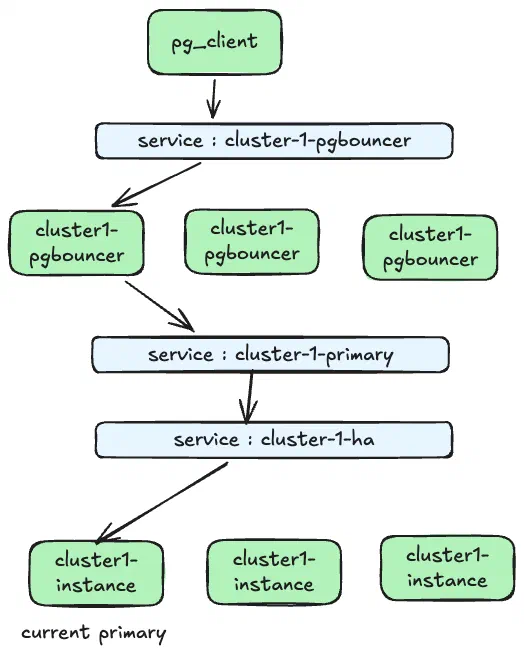
The host in the PGBOUNCER_URI points to the service cluster-1-pgbouncer which routes the connection to one of the pg_bouncer pods. The connection is then passed through two more services, cluster-1-primary and cluster-1-ha, to reach the current primary. Current being cluster1-instance1-8nz4-0.
The failover is controlled by patroni which will detect when a primary node fails and will promote a new Primary. To test this kill the current primary node.
kubectl  delete po cluster1-instance1-8nz4-0
pod "cluster1-instance1-8nz4-0" deleted from pg-operator namespace
and one of the Replicas will be promoted into it’s place
kubectl describe po cluster1-instance1-mp4b-0|grep role
    postgres-operator.crunchydata.com/role=primary
If you test the connection again you should end up on the new Primary
kubectl run -i --rm --tty pg-client --image=percona/percona-distribution-postgresql:18.6.1-1 --restart=Never -- psql $PGBOUNCER_URIcluster1=> SELECT inet_server_addr();
inet_server_addr
------------------
10.244.4.10
(1 row)and the old Primary has been added back into the cluster as a Replica
kubectl describe po cluster1-instance1-8nz4-0|grep role
    postgres-operator.crunchydata.com/role=replica
Run a Backup and verify it worked
The next step is try a backup to an object store, in this case the local RustFS container. This is the part where I initially struggled as the setup I’ve used for testing MySQL and PXC didn’t initially work. After much chatting with AI we jointly realised that pgBackRest ALWAYS speaks TLS to an S3 endpoint so TLS needs enabling first on the rustFS container.
Running the rust-enable-tls.sh script enables this.
./rust-enable-tls.shTo create a backup the Operator needs a secret containing the Access key and Secret Key for the object store. This can be created in a couple of ways:
The quick one-line version
printf '[global]\nrepo2-s3-key=%s\nrepo2-s3-key-secret=%s\n' \
  "$(kubectl get secret rustfs-admin-credentials -n rustfs -o jsonpath='{.data.access-key}' | base64 -d)" \
  "$(kubectl get secret rustfs-admin-credentials -n rustfs -o jsonpath='{.data.secret-key}' | base64 -d)" \
| kubectl create secret generic cluster1-pgbackrest-secrets -n pg-operator \
    --from-file=s3.conf=/dev/stdin --dry-run=client -o yaml \
| kubectl apply -f -
or by encoding the secret key into the s3.conf section in backup_secret.yaml and applying it.
kubectl get secret rustfs-admin-credentials -n rustfs -o jsonpath='{.data.secret-key}' | base64 -d

cat <<EOF | base64
[global]
repo2-s3-key=myadminuser
repo2-s3-key-secret<set to the output of the command above>
EOF

vi backup_secret.yaml

set the s3.conf: and add the string from the command cat command above

kubectl  apply -f backup_secret.yaml
The cluster now needs to be configured to backup to the bucket by applying cr-backup.yaml. This will add a new backup location repo2 to the CR which points to the bucket in RustFS. Make sure the bucket my-kind-bucketexists first.
The key parts of the new CR are
backups:
	pgbackrest:
		image: docker.io/percona/percona-pgbackrest:2.59.0-1
		configuration:
			- secret:
				name: cluster1-pgbackrest-secrets        <- The secret from above

		global:
			repo2-s3-uri-style: path
			repo2-storage-verify-tls: "n"

		........
		- name: repo2
			s3:
				bucket: "my-kind-bucket".    <- the backup bucket.
				endpoint: "https://rustfs-svc.rustfs.svc.cluster.local:9000"
				region: "us-east-1"
Apply the new CR and wait for all the pods to update.
kubectl apply -f cr-backup.yamlBefore we run the backup we can put some data in which should allow us to test the restore later
kubectl run -i --rm --tty pg-client --image=percona/percona-distribution-postgresql:18.6.1-1 --restart=Never -- psql $PGBOUNCER_URICut and paste the following SQL into the terminal
CREATE TABLE phonebook(phone VARCHAR(32), firstname VARCHAR(32), lastname VARCHAR(32), address VARCHAR(64));

INSERT INTO phonebook(phone, firstname, lastname, address) VALUES('+1 123 456 7890', 'John', 'Doe', 'North America');

SELECT * FROM phonebook;
Then run the backup and wait for it to finish:
kubectl apply -f backup.yaml
kubectl get perconapgbackup -wNAME CLUSTER REPO DESTINATION STATUS TYPE COMPLETED AGE
backup2 cluster1 repo2 s3://my-kind-bucket Running 3m38s
cluster1-backup-xr9r-9hvb7 cluster1 repo1 Succeeded full 7m10s 9m11s
backup2 cluster1 repo2 s3://my-kind-bucket Running full 4m
backup2 cluster1 repo2 s3://my-kind-bucket Running full 4m10s
backup2 cluster1 repo2 s3://my-kind-bucket Succeeded full 13s 4m10s
backup2 cluster1 repo2 s3://my-kind-bucket Succeeded full 14s 4m11sThere should now be a backup in the rustFS bucket - Either check on the UI or via AWS CLI
aws --no-verify-ssl --endpoint-url https://localhost:9000 \
s3 ls --recursive s3://my-kind-bucket/pgbackrest/repo2/backup/2026-10-13 15:21:19 243781 pgbackrest/repo2/backup/db/20261013-142013F/backup.manifest
2026-10-13 15:21:19 243781 pgbackrest/repo2/backup/db/20261013-142013F/backup.manifest.copy
2026-10-13 15:21:18 23 pgbackrest/repo2/backup/db/20261013-142013F/pg_data/PG_VERSION.gz
2026-10-13 15:21:19 195 pgbackrest/repo2/backup/db/20261013-142013F/pg_data/backup_label.gz
2026-10-13 15:21:18 87 pgbackrest/repo2/backup/db/20261013-142013F/pg_data/base/1/112.gz
2026-10-13 15:21:18 85 pgbackrest/repo2/backup/db/20261013-142013F/pg_data/base/1/113.gz
2026-10-13 15:21:15 13371 pgbackrest/repo2/backup/db/20261013-142013F/pg_data/base/1/1247.gz
2026-10-13 15:21:16 186 pgbackrest/repo2/backup/db/20261013-142013F/pg_data/base/1/1247_fsm.gz
2026-10-13 15:21:18 70 pgbackrest/repo2/backup/db/20261013-142013F/pg_data/base/1/1247_vm.gz
2026-10-13 15:21:15 38713 pgbackrest/repo2/backup/db/20261013-142013F/pg_data/base/1/1249.gz
.......Restore from a Backup
Before running the restore delete the row from the test table.
delete from phonebook;
select * from phonebook;
Find what backups are available
kubectl get pg-backupNAME CLUSTER REPO DESTINATION STATUS TYPE COMPLETED AGE
backup2 cluster1 repo2 s3://my-kind-bucket Succeeded full 2d1h 2d1h
cluster1-backup-xr9r-9hvb7 cluster1 repo1 Succeeded full 2d1h 2d1hDescribe the backup and find the backup name
kubectl describe pg-backup backup2Name: backup2
Namespace: pg-operator
Labels: <none>
Annotations: pgv2.percona.com/pgbackrest-backup-job-type: manual
API Version: pgv2.percona.com/v2
Kind: PerconaPGBackup
Metadata:
Creation Timestamp: 2026-10-13T14:17:24Z
Generation: 2
Resource Version: 3301
UID: eead1a51-2999-4391-bd30-d85c7575c24a
Spec:
Container Options:
Method: pgbackrest
Pg Cluster: cluster1
Repo Name: repo2
Status:
Backup Name: 20261013-142013F <- Backup Name
Backup Type: full
Completed: 2026-10-13T14:21:21Z
Cr Version: 3.1.0
Destination: s3://my-kind-bucket
Image: docker.io/percona/percona-pgbackrest:2.59.0-1
Job Name: cluster1-backup-24fx
Repo:
Name: repo2
s3:
Bucket: my-kind-bucket
Endpoint: https://rustfs-svc.rustfs.svc.cluster.local:9000
Region: us-east-1
Size: 31673834
State: Succeeded
Storage Type: s3Edit the restore.yaml and update the backup name next to the --set=20261013-142013F_20261015-165445I option, then apply it
kubectl apply -f restore.yamlThe restore will terminate all the Postgres Pods and restore them. Once they are back run the SQL to see if the row has been restored.
select * from phonebook;

      phone      | firstname | lastname |    address
-----------------+-----------+----------+---------------
 +1 123 456 7890 | John      | Doe      | North America
Tidy Up
Delete the kind cluster and everything else should go with it.
kind delete cluster --name percona-pgThis to me is a starting point where I can play without worrying about breaking stuff as it’s quick to rebuild. While doing this I came up with many ideas I wanted to try out but thats for the future. I’ve probably made loads of bad or wrong decisions setting this up but it’s a start and it works for me.
This post is part of the Percona Community Writers Program. ∎

Discussion
We invite you to our forum for discussion. You are welcome to use the widget below.