


LaserFocus - Keeping Our Goals in Sight
Every planning cycle starts the same way. We sit together, agree on a handful of goals and everyone leaves the meeting motivated. A few weeks later, Jira holds hundreds of tickets, new requests come in every day, and the question “are we actually working on what we agreed on?” gets harder and harder to answer.
Jira knows everything, but it does not tell you the story. You can build filters, dashboards and boards, and still end up clicking through ten views to find out that one goal has not moved in two weeks. We wanted one screen that answers that question at a glance. So we built one.
Meet LaserFocus.
What LaserFocus is
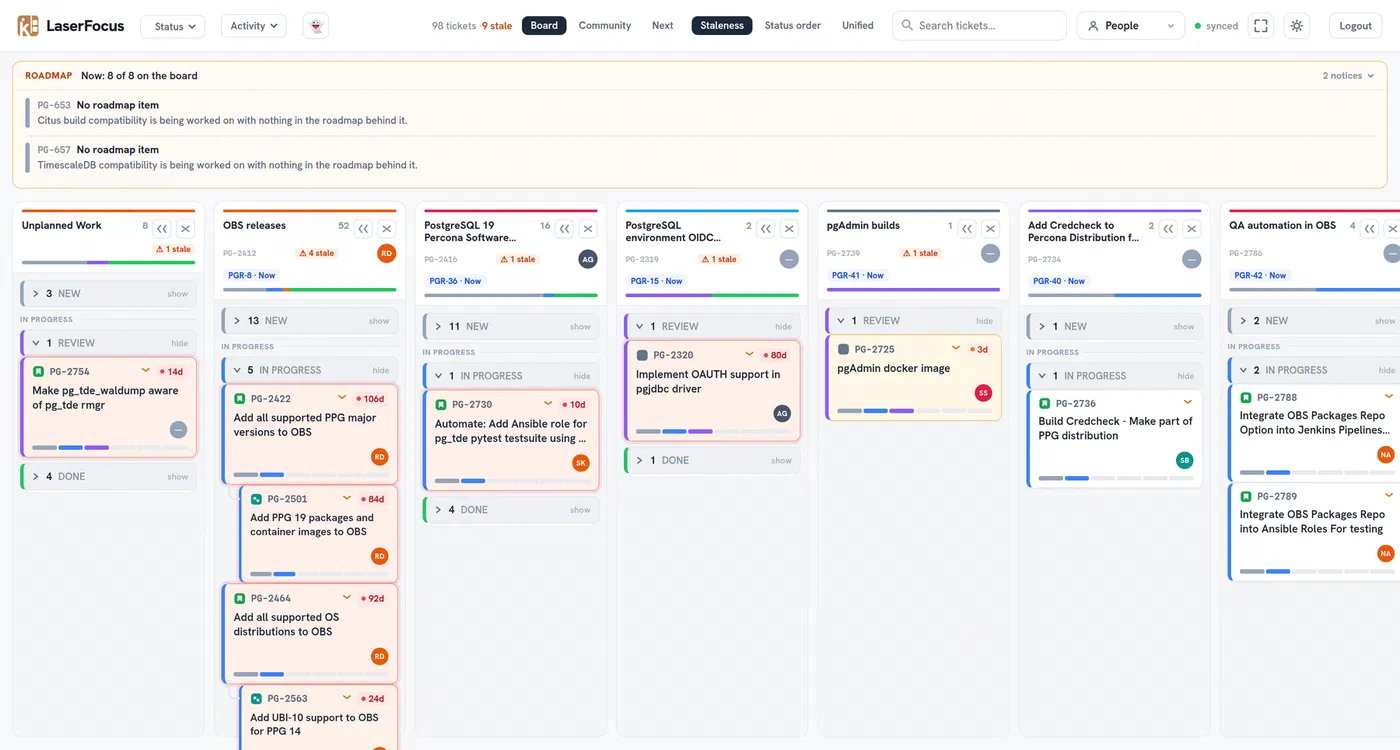
LaserFocus is a small, read-only dashboard on top of Jira. It polls Jira in the background, keeps a snapshot in a local SQLite database and renders a fast Kanban style board from it. It never writes back to Jira. Jira stays the source of truth, LaserFocus only makes it readable.
Zsolt started it in June, and since then we both kept adding the things we missed. It is Open Source and the code is on GitHub. It is still shaped quite a bit by how our team works, so expect some of the defaults to reflect our workflow rather than a generic one.
The idea behind it is simple:
- One column per goal: Every epic with the
Prioritylabel becomes a column. That label is our agreement on what matters this quarter. - Everything else is noise: If it does not belong to a goal, it does not get its own column. Tickets without a priority epic land in an “Unplanned Work” column, so unplanned work is visible, but it is also clearly marked as such.
- Time is the signal: The board cares less about what status a ticket has, and more about how long it has been sitting there.
Staleness, the most important color
Every card shows how many days it has been in its current state. After a few days a card turns yellow, after ten days it turns red.
This sounds like a small thing, but it is the whole point. Instead of asking “what’s the status of X?”, you see which work has stopped moving. A red card is meant as a conversation starter, not a blame game. Often it just needs a nudge, a review or a quick decision to move again.
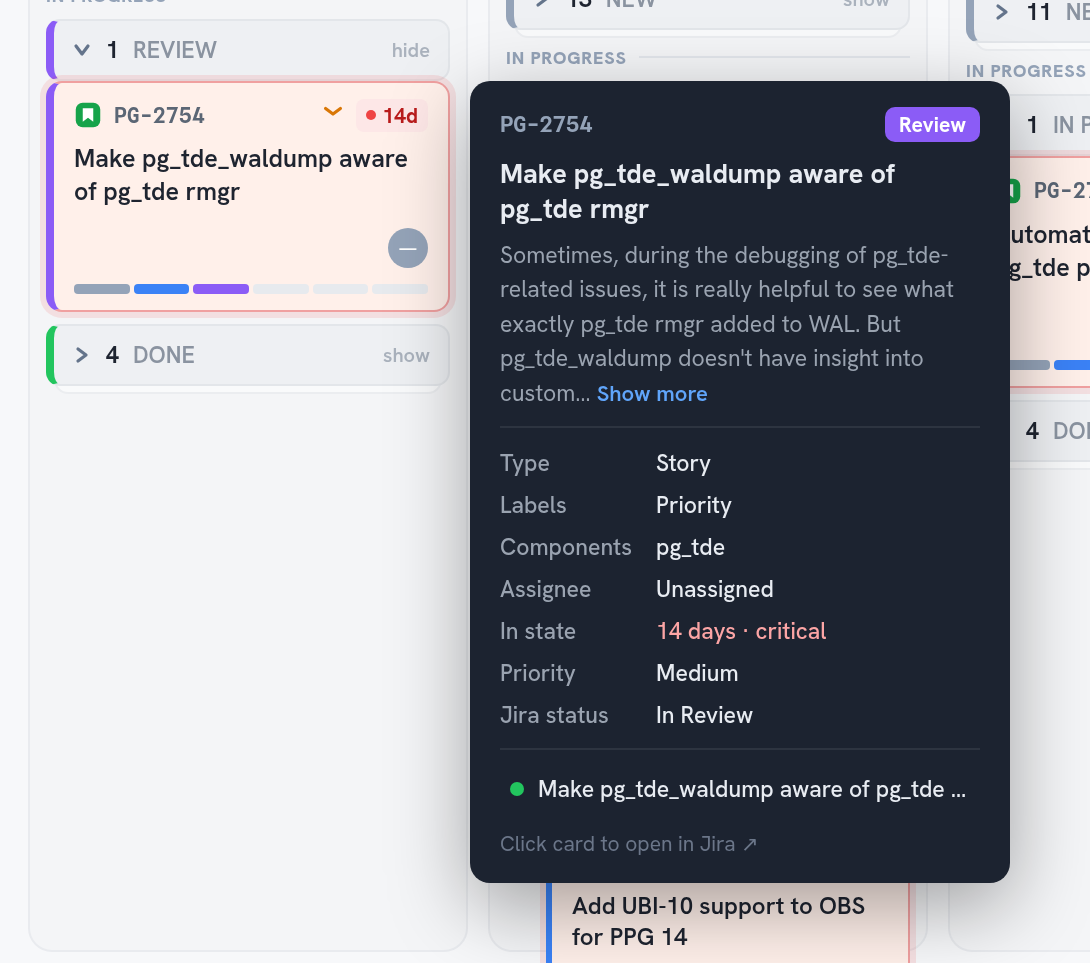
Hovering a card shows the details without opening Jira: the description, labels, components, the assignee, how long it has been in this state and any linked pull requests. One click opens the ticket in Jira.
Does the roadmap match reality?
We plan our roadmap in Jira Product Discovery, with “Now” and “Next” columns. The roadmap tells you what we committed to, the board tells you what we are actually doing. LaserFocus compares both, in one line above the board.

When the two agree, the line stays quiet. When they drift apart, it tells you:
- A “Now” commitment without a column: The roadmap says we are working on it, but nothing on the board belongs to it.
- Work without a roadmap item: Something is being worked on, but nothing in the roadmap is behind it.
- Committed, but nothing started: The column is there, but no ticket has left the to-do pile.
An epic behind a “Now” item joins the board automatically, even if somebody forgot the Priority label, so a missing label never hides a commitment.
Next: are we ready to start?
The “Next” column of the roadmap is a different question. Nothing there has started yet, so progress does not help. What helps is knowing if we could pick it up on Monday.
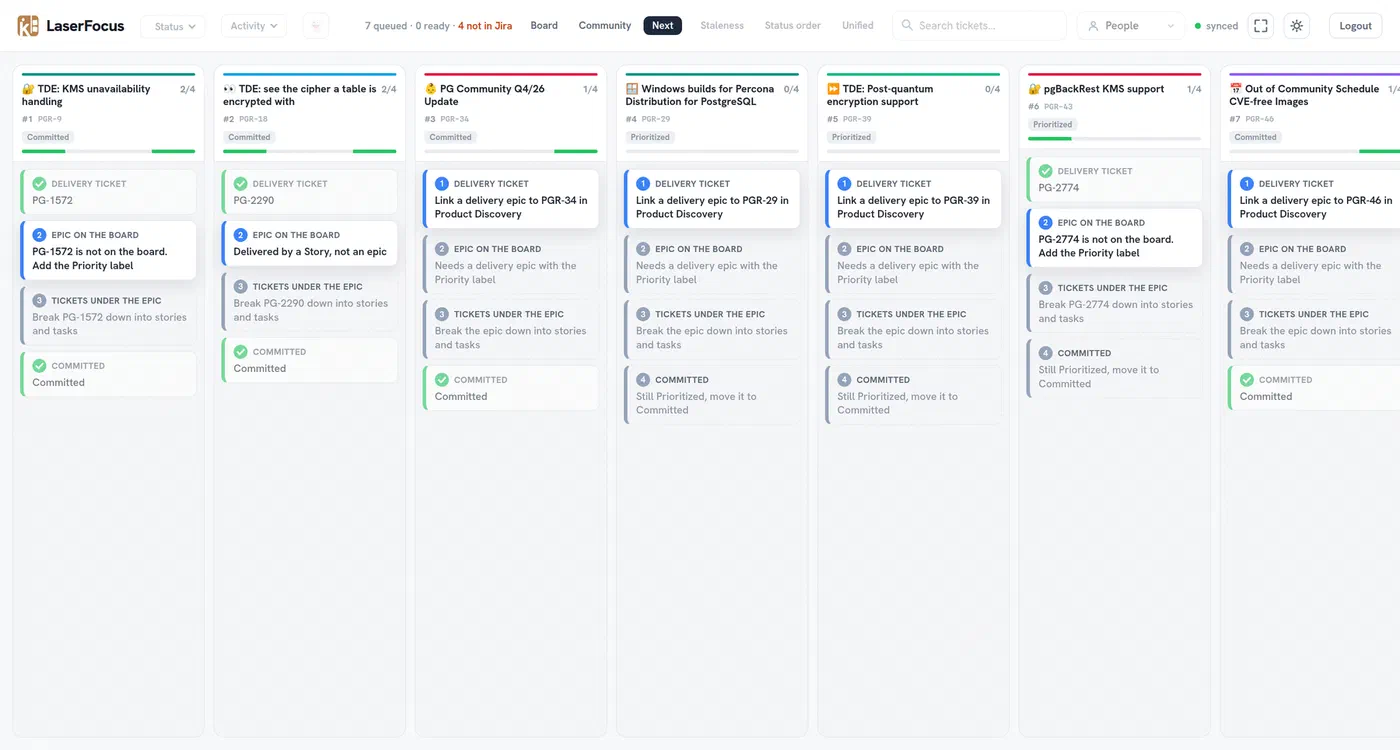
The Next view shows every item from the roadmap’s “Next” column as its own column, in roadmap order from left to right. The cards are the four steps an item needs before we can start working on it:
- A delivery ticket is linked in Product Discovery
- That ticket is an epic on the board
- The epic has stories and tasks
- The item is committed
Steps that are done fade back. The first open step tells you what to do next, for example “PG-1572 is not on the board. Add the Priority label”. That turns the Next column into a refinement queue for our planning meetings.
Community work gets its own view
A big part of what we do happens in the community: upstream patches for PostgreSQL, contributions to pgBackRest, talks and blog posts. That work is just as important as our product goals, but on a busy board it easily gets lost between everything else.
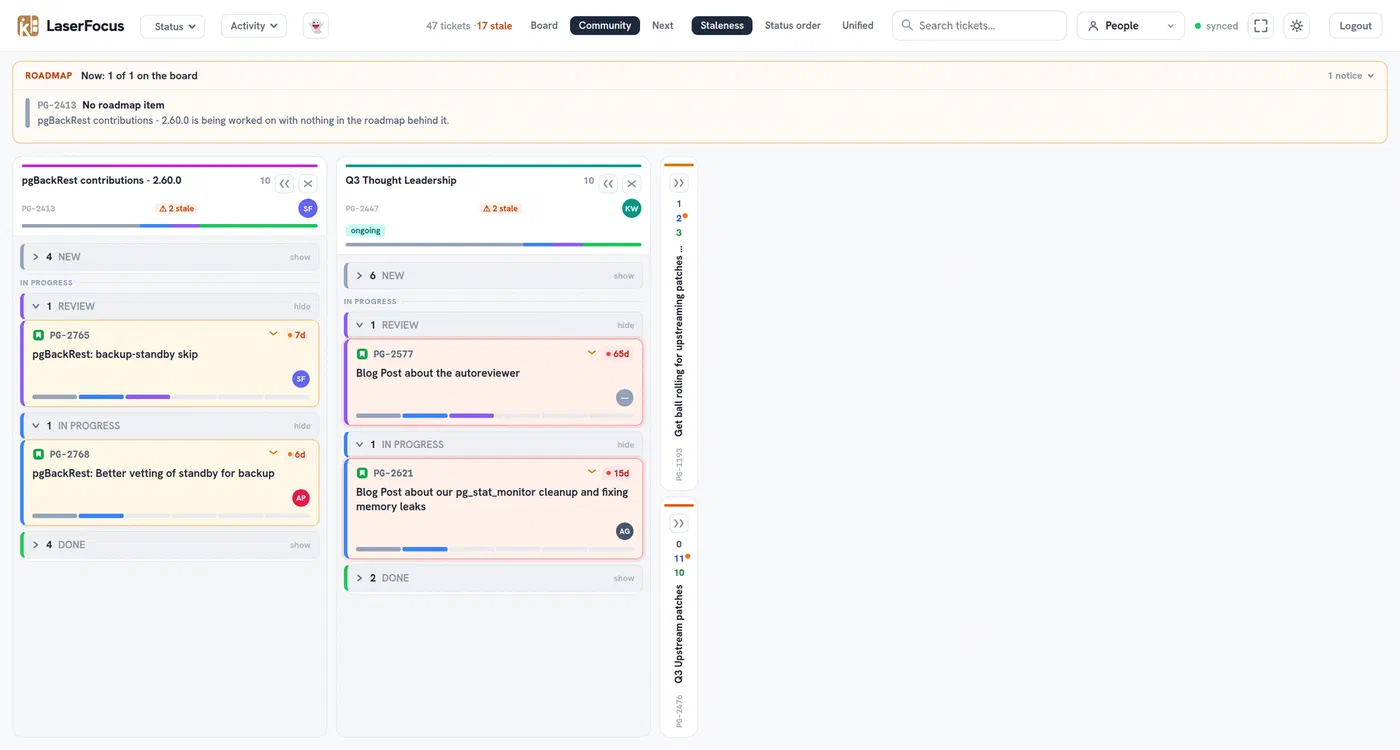
Every goal that also carries the Community label moves to its own Community view. It works exactly like the main board, with the same staleness colors, filters and roadmap line, but only for the community work. It makes it easy to show what we give back, and to spot when that work gets stuck.
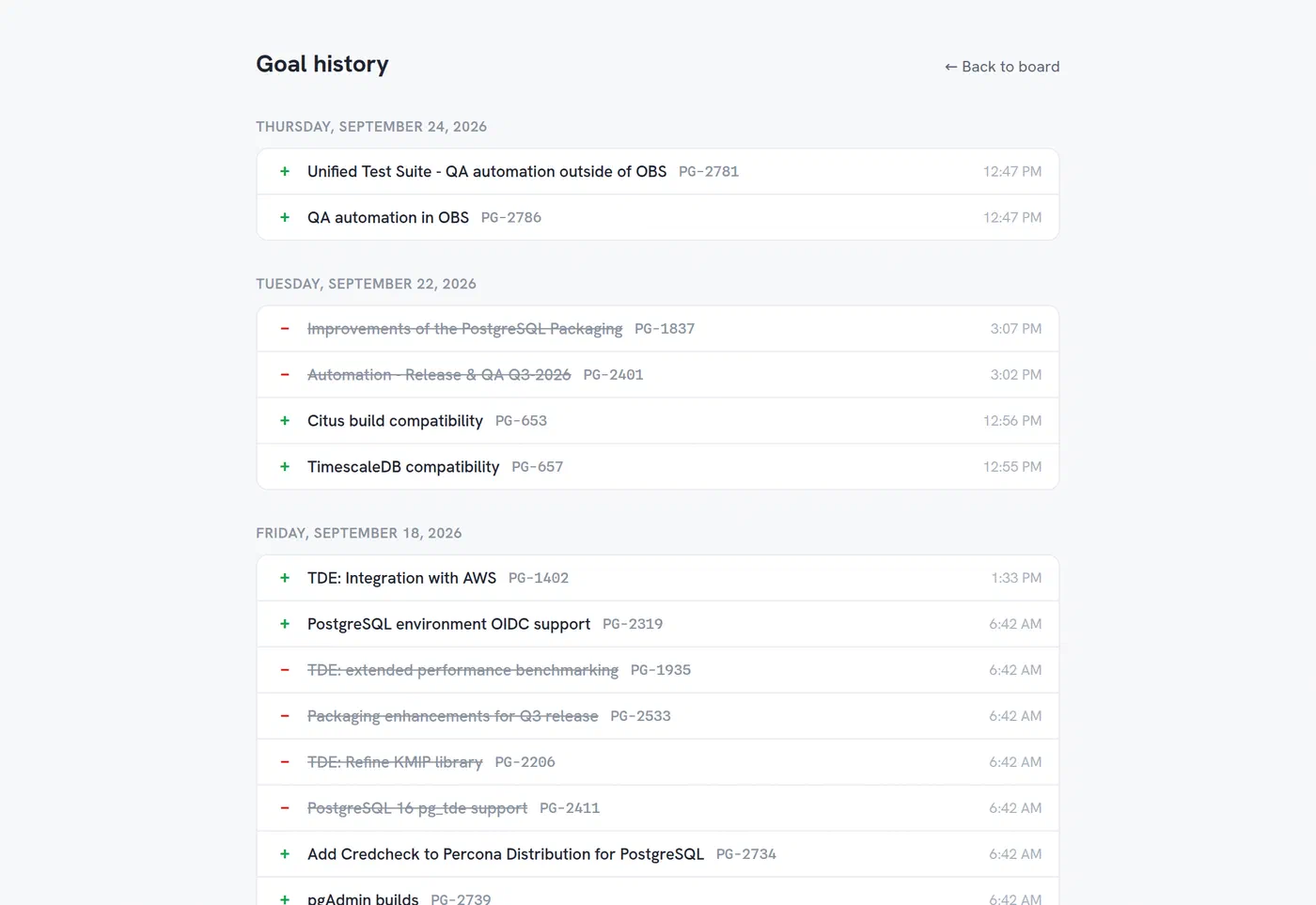
Goal history
Goals change during a quarter, and that is fine. But it should be visible. The goal history lists every goal that was added or removed, with the time it happened, based on Jira’s own changelog.
The small things
None of these are headline features, but you will notice them in daily use:
- Filters: By status, by activity (“updated within 3 days”, “not updated in 7 days”), by people, and a full text search
- Grouping: Sort the in-progress part of a column by the most stale ticket, by status order, or merge it into one list
- Collapsible columns: Fold a column into a narrow strip that still shows its counts, and a dot if something inside is stale
- Shared layout: Column order and collapsed columns are the same for everyone, so we all look at the same board
- Ongoing lane: Epics that never finish, like upstream work, are tagged as ongoing instead of being flagged as stalled
- The ghost button: Shows tickets that belong to an epic without the
Prioritylabel, the work that happens outside of our agreed goals - Adaptive polling: Syncs every minute while someone is looking at the board, and only every hour when nobody is
- Compact mode and dark mode: Fit all columns on one screen, day or night
- Google login: Restricted to your own domain or a list of email addresses
There is also a small easter egg. I leave that one to you to find ;-).
How it keeps us ahead of our goals
The idea is that you don’t walk through tickets one by one anymore. You look at the red cards, the roadmap line and the Next view, and talk about what is blocked. That leaves more time for the actual problems.
The most important part is not a single feature, it is that everyone sees the same picture. When the goals, the roadmap and the tickets are on one screen, it is very hard to drift away from them without noticing. And if we change direction on purpose, the goal history shows it.
Try it and share feedback
LaserFocus works with any Jira project. Almost everything is configurable: the JQL queries that define your goals and unplanned work, how your Jira statuses map to the board columns, the staleness thresholds, the labels for ongoing and community work, and optionally your Jira Product Discovery project for the roadmap features. Getting it running locally takes a few commands:
git clone https://github.com/Percona-Lab/laserfocus.git
cd laserfocus
cp .env.example .env
cp config/laserfocus.example.yml config/laserfocus.yml
task dev
The repository, including the configuration reference, can be found here: https://github.com/Percona-Lab/laserfocus
Is this useful for your team? What is missing? What would you change? Bug reports, feature requests, and contributions are all welcome: https://github.com/Percona-Lab/laserfocus/issues
Thanks for taking a look, and we appreciate any feedback. ∎



Discussion
We invite you to our forum for discussion. You are welcome to use the widget below.