


The curious case of timezone inconsistencies between PgBouncer and Patroni Cluster
Andrea Gnemmi
 Community
I would like to introduce here the curious case that I had on a Patroni Cluster in production, after a migration from Oracle, with timezone differences between what was written from an application log and what was set in PostgreSQL.
First of all a quick description of our setup. We have a two nodes Patroni cluster on Open Stack virtual machines, PostgreSQL 18, with leader and a read only replica, so we write only on one node and use the second for data extractions. All applications use Kubernetes pods that are also setup in Open Stack and access PostgreSQL via PgBouncer connection pooler. We do have also some Java application making use of their own Hikari connection pooler. All on premises.
The application, being a legacy one, needed to use all the time data types in the timezone of the customer, so I had to setup the timezone of the PostgreSQL cluster different from the one of the VMs, that is in UTC. That was the first error as I set it up using a simple ALTER SYSTEM SET TIMEZONE followed by a SELECT pg_reload_conf(). This changes the timezone on the postgresql.auto.conf configuration file, which is totally good if you have a normal single node or replica PostgreSQL but not with a Patroni Cluster! I will return on this point in a moment.
In itself the migration was fine, but we had to tailor a little bit the resources assigned to the nodes as unfortunately we were not able to test, prior to the migration, some parts of the application. So we had to increase RAM on the VMs and modify shared_buffers parameter, doing a restart of the PostgreSQL cluster one node at a time.
Unfortunately the restart wiped out the timezone configuration that I did, as I should have added this through a patronictl edit-config command as I did for the shared_buffers. At least we recognized quickly the problem as the timezone of the whole Patroni Cluster reverted back to UTC. This time I changed it modifying the Patroni Cluster configuration, using the following patronictl command edit-config:

Fig. 1 – patronictl edit-config command
And adding the correct timezone:

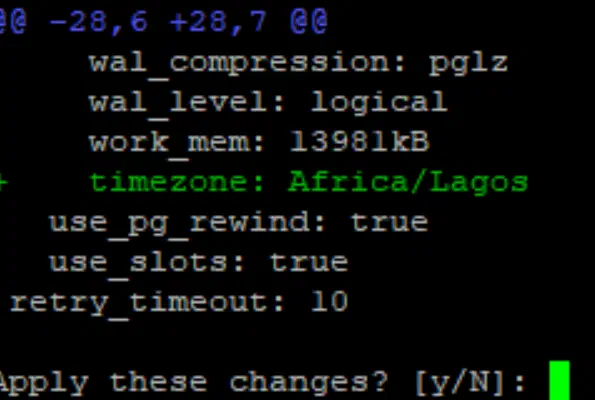
Fig. 2 – Result of edit-config command
Confirmed issuing a show-config:

Fig. 3 – Result of show-config command
After that we resumed normal operations and all seemed fine, problem solved, no big issue or disruptions to our customer.
The day after I got contacted by one developer telling me that PostgreSQL in production is still in UTC. I checked it immediately and it was instead in WAT, confirmed issuing:
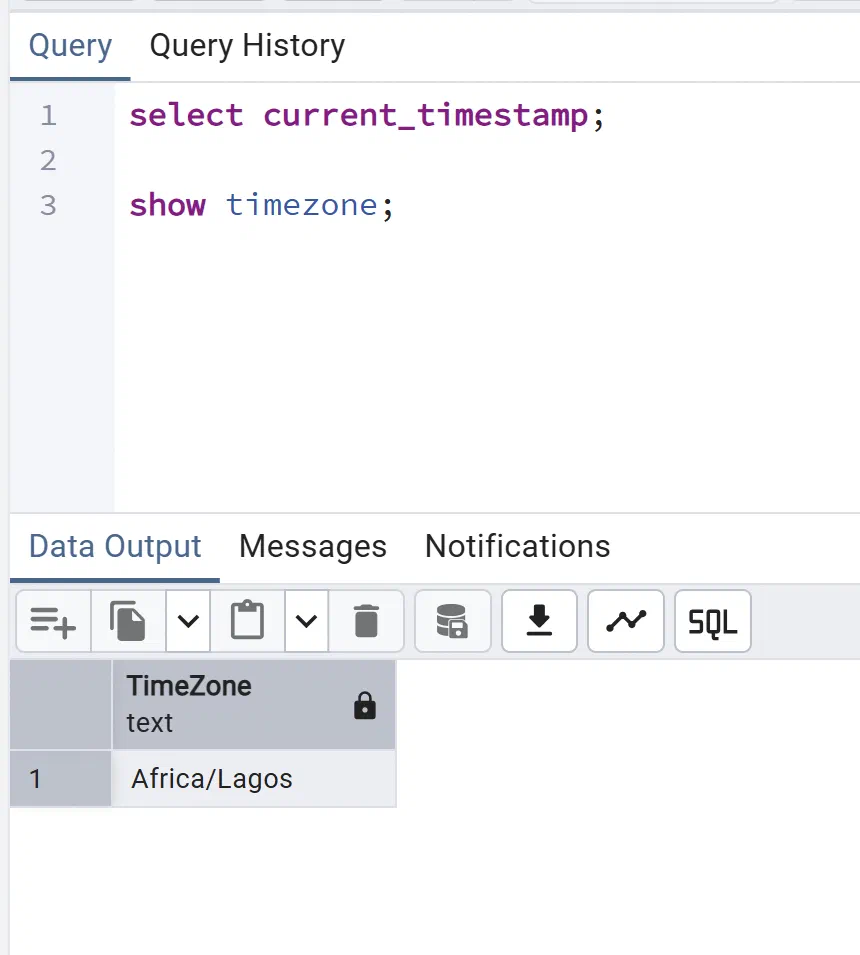
Fig. 4 – Screenshot of show timezone in pgAdmin
Then the developers sent me the results of a query done on an application log table showing a clear inconsistency of timestamps, some were correct and some with UTC timezone! That is a very bad scenario, where you do not have a clear indication, all wrong or all correct, but mixed results.
I started suspecting that there was something wrong on the application side as all that I saw on the database was correct, except some of the values that were recorded. So my next move was to ask devops to restart one by one all the application pods (remember that we are using Kubernetes).
This action brought mixed results as at the beginning it seemed that problem was solved and no rows with timestamp with wrong timezone was inserted…but after some time the first rows with UTC started resurfacing again! That was weird so I started digging a little bit more and searched our setup and our structure, as I was sure that the PostgreSQL database in itself was not the culprit.
As you may have guessed at this point there was one Elephant in the room that I had not yet investigated (and no was not PostgreSQL Elephant, AKA Slonik): PgBouncer! In fact I had totally left out of the picture the connection pooler as I thought that it was installed in kubernetes as a sidecar of the application pods, so expecting that a restart of the pods would have affected also PgBouncer.
As that was the architectural schema that was decided some years ago for our applications. Turned out that this was not the case!
Let’s make a quick excursus on why it is extremely important to have a connection pooler in PostgreSQL, the pool mode parameter of PgBouncer and the possible ways of installing and configuring it. These points are important to understand our case.
PostgreSQL connections are costly, mainly in terms of RAM, so much that there is a parameter max_connections to limit the maximum number of sessions, both active and idle. The default value is 100 which obviously is quite low, but rising it means that we need to ensure that we have enough RAM available, as the overhead for each connection is roughly 10 Mb. Bringing this parameter up for example to 500 means having already 5 Gb of RAM used just for idle connections, without even issuing any query!
Here is where connection poolers come to the rescue, as they are capable of recycling the connections, so that applications do not need to open a new connection each time they need to query the database. The pool maintains a fixed set of open connections, all requests borrow a connection, use it, and return it to the pool. The connection itself is never closed between requests, it stays open and ready so that the next request picks it up instantly.
PgBouncer is the de facto standard for connection pooling in PostgreSQL as it is lightweight, easy to configure and maintain. There is a very important setup choice to be made when installing PgBouncer: the pool mode, that decides the behaviour of the pooler. There are 3 possible choices: Session – Transaction – Statement.
Session Pooling: Assigns a server connection to a client as soon as it connects and holds it until the client disconnects. It acts almost like a direct connection to PostgreSQL, supporting all session features, but offers the least connection reuse. This is the most safe way to configure PgBouncer, and since we use some session features like Prepared Statements, this was our choice.
Transaction Pooling: Assigns a server connection only for the duration of a single BEGIN … COMMIT/ROLLBACK transaction. Once the transaction completes, the connection goes back to the pool for another client to use.
Statement Pooling: Assigns a server connection for a single SQL statement, returning it immediately after execution. It allows maximum reuse, but breaks multi-statement transactions (BEGIN … COMMIT) and session features.
One last word on what are the recommended ways to install PgBouncer: first of all it should be on a separate server respect the PostgreSQL cluster, then in a Kubernetes environment, such as ours, it can be installed as a sidecar to Kubernetes pods (which is the recommended way for most cases) or as a separate deployment in its own pod. Turns out that we had installed PgBouncer in this last way instead of having it in the same pod of the application.
Now that we have a complete picture, let’s go back to our case. Since our PgBouncer was installed as a standalone pod and not in sidecar, this become my primary culprit, searching a little bit I found out that there is the possibility in PgBouncer that if a database is created or its timezone is altered via ALTER DATABASE … SET timezone, PgBouncer does not properly invalidate its internal startup-parameter cache.
In our case the timezone was changed through Patroni, not ALTER DATABASE, but PgBouncer still kept a stale cached TimeZone.
So when a connection is recycled:
- PostgreSQL natively sets the timezone to Africa/Lagos.
- PgBouncer looks at its cached baseline state for that database/user profile from when it first booted up (which was reset to UTC when we restarted the Patroni nodes remember!).
- PgBouncer then subtly injects a session-level override back to the client, effectively masking the database’s actual default settings.
It was exactly our case, as the restart of Patroni Cluster nodes returned all the system to UTC, then we modified it again to WAT, but we never restarted the PGBouncer pod, so we still had some sessions in the pool with UTC timezone. That explained also the mix between correct and wrong timezones in the timestamps, it depended from the session with which the row was inserted, if it was one of the old ones we had UTC.
The fix at this point was obvious: clear the cache of PgBouncer. This can be done with a simple restart of that pod or a reload of the configuration. In our case we restarted PgBouncer and surely this action solved all our timezone problems as from that point we had only timestamps with correct timezone, confirming the above scenario.
So this was the curious case of timezone inconsistencies between PostgreSQL and PgBouncer, in the end was easily solved and not disruptive, it was due mainly to a couple of errors and assumptions that I did and that were surely avoidable, that’s why I wanted to bring attention to this subject: prevent others doing my errors and recognize faster the issue.
Summarizing all in a few key points of lessons learned:
- After changing timezone in Patroni, always restart or RECONNECT PgBouncer so the pool doesn’t keep stale session settings.
- Remember to always change timezone in a Patroni cluster using patronictl command edit-config and not ALTER SYSTEM SET TIMEZONE.
- In a Kubernetes environment install PgBouncer as a sidecar to Kubernetes pods instead of a standalone pod.
Hope it will help some of you!
This post is part of the Percona Community Writers Program. ∎



Discussion
We invite you to our forum for discussion. You are welcome to use the widget below.