%22%3E%3Cpath%20d=%22M352.016%20109.322h-18.62v33.317H308.887V31.542h45.54c26.587.0%2042.669%2015.7006%2042.669%2038.4065V70.2514c0%2025.715-20.051%2039.0416-45.051%2039.0416L352.016%20109.322v0zm20.207-38.885C372.223%2059.4847%20364.589%2053.6128%20352.32%2053.6128H333.367V87.5641H352.78c12.27.0%2019.414-7.3081%2019.414-16.8242V70.437H372.223z%22%20fill=%22%23fff%22/%3E%3Cpath%20d=%22M410.776%20142.648V31.542H494.84V53.3001H435.139V75.8497h52.527V97.6078H435.139V120.949h60.494v21.758H410.776V142.648v0z%22%20fill=%22%23fff%22/%3E%3Cpath%20d=%22M582.46%20142.648%20558.588%20107.104H539.331v35.544H514.822V31.542h50.939c26.284.0%2042.032%2013.815%2042.032%2036.6674V68.5123c0%2017.9282-9.702%2029.2128-23.872%2034.4497L611.145%20142.639H582.451L582.46%20142.648zM582.95%2069.4893C582.95%2059.0255%20575.62%2053.603%20563.694%2053.603H539.341V85.5026h24.843C576.12%2085.5026%20582.95%2079.1422%20582.95%2069.8019V69.4991%2069.4893z%22%20fill=%22%23fff%22/%3E%3Cpath%20d=%22M678.058%20145.618c-33.221.0-57.907-25.568-57.907-57.9171V87.3882C620.151%2055.3812%20644.337%2029.1678%20679.048%2029.1678c21.285.0%2034.055%207.0639%2044.54%2017.3616L707.781%2064.6922C699.059%2056.7979%20690.21%2051.9909%20678.891%2051.9909c-19.021.0-32.761%2015.7593-32.761%2035.0652V87.3687c0%2019.3063%2013.397%2035.3683%2032.761%2035.3683C691.788%20122.737%20699.706%20117.588%20708.585%20109.537l15.807%2015.916C712.76%20137.851%20699.863%20145.56%20678.088%20145.56L678.058%20145.618z%22%20fill=%22%23fff%22/%3E%3Cpath%20d=%22M789.963%20145.618c-34.858.0-59.858-25.9-59.858-57.9171V87.3882c0-32.007%2025.333-58.2204%2060.162-58.2204%2034.829.0%2059.858%2025.9007%2059.858%2057.9176V87.398c0%2032.007-25.333%2058.22-60.162%2058.22zm34.212-58.22C824.175%2068.0922%20809.975%2052.03%20789.963%2052.03%20769.952%2052.03%20756.095%2067.7893%20756.095%2087.0951V87.4078C756.095%20106.714%20770.295%20122.776%20790.306%20122.776%20810.318%20122.776%20824.175%20107.017%20824.175%2087.7107V87.398v0z%22%20fill=%22%23fff%22/%3E%3Cpath%20d=%22M985.089%20142.736%201039.93%2029.1678%201094.77%20142.746h-27.5L1039.93%2086.2256l-27.24%2056.5204H985.089V142.736z%22%20fill=%22%23fff%22/%3E%3Cpath%20d=%22M974.936%2031.5811V145.628L891.304%2078.0968V142.551H865.285V29.1678L948.917%2096.4354V31.5811h26.019z%22%20fill=%22%23fff%22/%3E%3C/g%3E%3Cpath%20d=%22M219.315%20146.829c28.718-18.788%2038.114-57.1102%2020.735-87.2301-8.708-15.108-22.784-25.9277-39.624-30.4456-15.602-4.1923-31.898-2.478-46.241%204.7743L134.603.0%2093.9541%2070.4613.0%20233.311H269.206l-49.891-86.482zM195.821%2046.4134c12.241%203.263%2022.427%2011.1294%2028.771%2022.0826%2012.47%2021.5912%205.993%2048.977-14.23%2062.808L163.128%2049.4361c10.176-4.8971%2021.653-5.9652%2032.693-3.0227zM134.603%2035.7593%20238.247%20215.426H177.605L104.268%2088.3409l30.329-52.5762L134.603%2035.7593zM30.9588%20215.426l62.99-109.168L156.939%20215.426H30.9588z%22%20fill=%22url(%23paint0_linear_1391_11470)%22/%3E%3Cpath%20d=%22M306.655%20202.335C306.655%20196.555%20307.958%20191.37%20310.565%20186.78%20313.172%20182.133%20316.713%20178.507%20321.19%20175.9%20325.723%20173.293%20330.738%20171.99%20336.235%20171.99%20342.695%20171.99%20348.333%20173.548%20353.15%20176.665%20357.967%20179.782%20361.48%20184.202%20363.69%20189.925H354.425C352.782%20186.355%20350.402%20183.607%20347.285%20181.68%20344.225%20179.753%20340.542%20178.79%20336.235%20178.79%20332.098%20178.79%20328.387%20179.753%20325.1%20181.68%20321.813%20183.607%20319.235%20186.355%20317.365%20189.925%20315.495%20193.438%20314.56%20197.575%20314.56%20202.335%20314.56%20207.038%20315.495%20211.175%20317.365%20214.745%20319.235%20218.258%20321.813%20220.978%20325.1%20222.905%20328.387%20224.832%20332.098%20225.795%20336.235%20225.795%20340.542%20225.795%20344.225%20224.86%20347.285%20222.99%20350.402%20221.063%20352.782%20218.315%20354.425%20214.745H363.69C361.48%20220.412%20357.967%20224.803%20353.15%20227.92%20348.333%20230.98%20342.695%20232.51%20336.235%20232.51%20330.738%20232.51%20325.723%20231.235%20321.19%20228.685%20316.713%20226.078%20313.172%20222.48%20310.565%20217.89%20307.958%20213.3%20306.655%20208.115%20306.655%20202.335zm130.259%2030.26C431.418%20232.595%20426.403%20231.32%20421.869%20228.77%20417.336%20226.163%20413.738%20222.565%20411.074%20217.975%20408.468%20213.328%20407.164%20208.115%20407.164%20202.335S408.468%20191.37%20411.074%20186.78C413.738%20182.133%20417.336%20178.535%20421.869%20175.985%20426.403%20173.378%20431.418%20172.075%20436.914%20172.075%20442.468%20172.075%20447.511%20173.378%20452.044%20175.985%20456.578%20178.535%20460.148%20182.105%20462.754%20186.695%20465.361%20191.285%20466.664%20196.498%20466.664%20202.335%20466.664%20208.172%20465.361%20213.385%20462.754%20217.975%20460.148%20222.565%20456.578%20226.163%20452.044%20228.77%20447.511%20231.32%20442.468%20232.595%20436.914%20232.595zm0-6.715C441.051%20225.88%20444.763%20224.917%20448.049%20222.99%20451.393%20221.063%20453.999%20218.315%20455.869%20214.745%20457.796%20211.175%20458.759%20207.038%20458.759%20202.335%20458.759%20197.575%20457.796%20193.438%20455.869%20189.925%20453.999%20186.355%20451.421%20183.607%20448.134%20181.68%20444.848%20179.753%20441.108%20178.79%20436.914%20178.79%20432.721%20178.79%20428.981%20179.753%20425.694%20181.68%20422.408%20183.607%20419.801%20186.355%20417.874%20189.925%20416.004%20193.438%20415.069%20197.575%20415.069%20202.335%20415.069%20207.038%20416.004%20211.175%20417.874%20214.745%20419.801%20218.315%20422.408%20221.063%20425.694%20222.99%20429.038%20224.917%20432.778%20225.88%20436.914%20225.88zm134.906-52.7V232H564.085V188.14L544.535%20232H539.095L519.46%20188.055V232H511.725V173.18H520.055L541.815%20221.8l21.76-48.62H571.82zm108.063.0V232H672.148V188.14L652.598%20232H647.158l-19.635-43.945V232H619.788V173.18H628.118l21.76%2048.62%2021.76-48.62H679.883zM735.416%20172.755V210.24C735.416%20215.51%20736.691%20219.42%20739.241%20221.97%20741.848%20224.52%20745.446%20225.795%20750.036%20225.795%20754.57%20225.795%20758.111%20224.52%20760.661%20221.97%20763.268%20219.42%20764.571%20215.51%20764.571%20210.24V172.755H772.306v37.4C772.306%20215.085%20771.315%20219.25%20769.331%20222.65%20767.348%20225.993%20764.656%20228.487%20761.256%20230.13%20757.913%20231.773%20754.145%20232.595%20749.951%20232.595%20745.758%20232.595%20741.961%20231.773%20738.561%20230.13%20735.218%20228.487%20732.555%20225.993%20730.571%20222.65%20728.645%20219.25%20727.681%20215.085%20727.681%20210.155v-37.4H735.416zM866.64%20232H858.905l-31.11-47.175V232H820.06V172.67H827.795l31.11%2047.09V172.67H866.64V232zm55.77-59.245V232H914.675V172.755H922.41zm84.5.0V179.045H990.758V232H983.023V179.045H966.788V172.755h40.122zm85.85.0-19.3%2036.89V232H1065.73V209.645L1046.35%20172.755H1054.93L1069.55%20202.76%201084.17%20172.755H1092.76z%22%20fill=%22%23fff%22/%3E%3Cdefs%3E%3ClinearGradient%20id=%22paint0_linear_1391_11470%22%20x1=%2230.363%22%20y1=%22238.463%22%20x2=%22230.327%22%20y2=%2238.6685%22%20gradientUnits=%22userSpaceOnUse%22%3E%3Cstop%20stop-color=%22%23FC3519%22/%3E%3Cstop%20offset=%221%22%20stop-color=%22%23F0D136%22/%3E%3C/linearGradient%3E%3CclipPath%20id=%22clip0_1391_11470%22%3E%3Crect%20width=%22962.614%22%20height=%22116.656%22%20fill=%22%23fff%22%20transform=%22translate(132.155%2028.9724)%22/%3E%3C/clipPath%3E%3C/defs%3E%3C/svg%3E)
MySQL Security Best Practices: A Practical Guide for Locking Down Your Database
Introduction
MySQL runs just about everywhere. I’ve seen it behind small personal projects, internal tools, SaaS platforms, and large enterprise systems handling serious transaction volume. When your database sits at the center of everything, it becomes part of your security perimeter whether you planned it that way or not. And that makes it a target.
Securing MySQL isn’t about flipping one magical setting and calling it done. It’s about layers. Tight access control. Encrypted connections. Clear visibility into what’s happening on the server. And operational discipline that doesn’t drift over time.
In this guide, I’m going to walk through practical MySQL security best practices that you can apply right away. These are the kinds of checks and hardening steps that reduce real risk in real environments, and help build a database platform that stays resilient under pressure.
1. Principle of Least Privilege
One of the most common security mistakes is over-granting privileges. Applications and users should have only the permissions they absolutely need.
Bad Practice
GRANT ALL PRIVILEGES ON *.* TO 'appuser'@'10.%';Better Approach
GRANT SELECT, INSERT, UPDATE ON appdb.* TO 'appuser'@'10.%';Recommendations
- Avoid global privileges unless absolutely required
- Restrict users by host whenever possible
- Separate admin accounts from application accounts
- Use different credentials for read-only vs write operations
Audit Existing Privileges
SELECT user, host, Select_priv, Insert_priv, Update_priv, Delete_priv
FROM mysql.user;
2. Strong Authentication & Password Policies
Weak credentials remain one of the easiest attack vectors.
Enable Password Validation
component_validate_password is MySQL’s modern password policy engine. Think of it as a gatekeeper for credential quality. Every time someone tries to set or change a password, it checks whether that password meets your defined security standards before letting it in.
It replaces the older validate_password plugin with a component-based architecture that is more flexible and better aligned with MySQL 8.x design.
INSTALL COMPONENT 'file://component_validate_password';What It Does
When enabled, it enforces rules such as:
- Minimum password length
- Required mix of character types
- Dictionary file checks
- Strength scoring
If a password fails policy, the statement is rejected before the credential is stored.
Why It Matters
Weak passwords remain one of the most common entry points in database breaches. This component reduces risk by enforcing baseline credential hygiene automatically, instead of relying on developer discipline.
Recommended Policies
- Minimum length: 14+ characters
- Require mixed case, numbers, and symbols
- Enable dictionary checks
- Enable username checks
Remove Anonymous Accounts
Find Anonymous Users
Anonymous users have an empty User field.
SELECT user, host FROM mysql.user WHERE user='';If you see rows returned, those are anonymous accounts.
Drop Anonymous Users
In modern MySQL versions:
DROP USER ''@'localhost';
DROP USER ''@'%';
Adjust the Host value based on what your query returned.
Why This Matters
Anonymous users:
- Allow login without credentials
- May have default privileges in some distributions
- Increase the attack surface unnecessarily
In hardened environments, there should be zero accounts with an empty username. Every identity should be explicit, accountable, and least-privileged.
3. Encryption Everywhere
Encryption protects data both in transit and at rest.
Enable Transparent Data Encryption (TDE)
See my January 13 post for a deep dive into Transparent Data Encryption: Configuring the Component Keyring in Percona Server and PXC 8.4
Enable TLS for Connections
require_secure_transport=ONVerify SSL Usage
SHOW STATUS LIKE 'Ssl_cipher';Encryption Areas to Consider
- Client-server connections
- Replication channels
- Backups and snapshot storage
- Disk-level encryption
4. Patch Management & Version Hygiene
Running outdated MySQL versions is equivalent to leaving known vulnerabilities exposed.
Maintenance Strategy
- Track vendor security advisories
- Apply minor updates regularly
- Test patches in staging before production rollout
- Avoid unsupported MySQL versions
Check Version
SELECT VERSION();5. Logging, Auditing, and Monitoring
Security without visibility is blind defense, enable Audit Logging.
1. audit_log Plugin (Legacy Model)
Installation
INSTALL PLUGIN audit_log SONAME 'audit_log.so';Verify
SHOW PLUGINS LIKE 'audit%';2. audit_log_filter Component (Modern Model)
Introduced in MySQL 8 to provide a more flexible and granular alternative to the older plugin model.
Installation
INSTALL COMPONENT 'file://component_audit_log_filter';Verify
SELECT * FROM mysql.component;Architecture Difference
Instead of a single global policy, you create:
- Filters (define what to log)
- Users assigned to filters
It’s granular and rule-driven.
Auditing Key Events
- Failed logins
- Privilege changes
- Schema modifications
- Unusual query activity
References:
Useful Metrics
SHOW GLOBAL STATUS LIKE 'Aborted_connects';
SHOW GLOBAL STATUS LIKE 'Connections';
6. Secure Configuration Hardening
A secure baseline configuration reduces risk from common attack patterns.
Recommended Settings
local_infile=OFF
secure_file_priv=/var/lib/mysql-files
sql_mode="STRICT_ALL_TABLES"
secure-log-path=/var/log/mysql
Why These Matter
- Prevent arbitrary file imports
- Reduce filesystem abuse
- Restrict data export/import locations
7. Backup Security
Backups often contain everything an attacker wants.
Backup Best Practices
- Encrypt backups
- Restrict filesystem permissions
- Store offsite copies securely
- Rotate backup credentials
- Verify restore procedures regularly
Example Permission Check
ls -l /backup/mysql8. Replication & Cluster Security
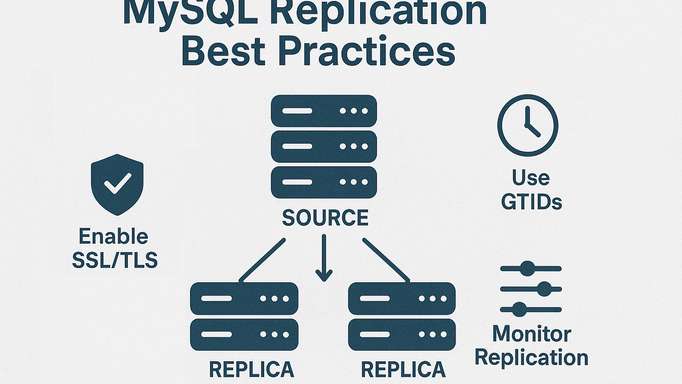
Replication is not just a data distribution feature. It is a persistent, privileged communication channel between servers. If misconfigured, it can become a lateral movement pathway inside your infrastructure. Treat every replication link as a trusted but tightly controlled corridor.
Principle: Replication Is a Privileged Service Account
Replication users require elevated capabilities. They must be isolated, tightly scoped, and monitored like any other service identity.
Secure Replication Users
CREATE USER 'repl'@'10.%'
  IDENTIFIED BY 'strongpassword'
  REQUIRE SSL;

GRANT REPLICATION REPLICA ON *.* TO 'repl'@'10.%';
Hardening considerations:
- Restrict host patterns as narrowly as possible. Avoid % whenever feasible.
- Require SSL or X.509 certificate authentication.
- Enforce strong password policies or use a secrets manager.
- Disable interactive login capability if applicable.
Encrypt Replication Traffic
Replication traffic may include sensitive row data, DDL statements, and metadata. Always encrypt it.
At minimum:
- Enable require_secure_transport=ON
- Configure TLS certificates on source and replica
- Set replication channel to use SSL:
CHANGE REPLICATION SOURCE TO
  SOURCE_SSL=1,
  SOURCE_SSL_CA='/path/ca.pem',
  SOURCE_SSL_CERT='/path/client-cert.pem',
  SOURCE_SSL_KEY='/path/client-key.pem';
For MySQL Group Replication or InnoDB Cluster:
- Enable group communication SSL
- Validate certificate identity
- Use dedicated replication networks
Binary Log and Relay Log Protection
Replication relies on binary logs. Protect them.
- Set binlog_encryption=ON
- Set relay_log_info_repository=TABLE
- Restrict filesystem access to log directories
- Monitor log retention policies
Compromised binary logs can reveal historical data changes.
9. Continuous Security Reviews
Security is not a one-time checklist. Regular audits help catch configuration drift and evolving threats.
Suggested Review Cadence
- Weekly: failed login review
- Monthly: privilege audits
- Quarterly: configuration review
- Semiannually: full security assessment
Security Checklist Summary
| Area | Key Action |
|---|---|
| Access Control | Least privilege grants |
| Authentication | Strong password policies |
| Encryption | TLS + encrypted storage |
| Updates | Regular patching |
| Monitoring | Audit logging enabled |
| Configuration | Harden defaults |
| Backups | Encrypt and protect |
| Replication | Secure replication users |
Final Thoughts
Strong MySQL security doesn’t come from one feature or one tool. It comes from layers working together. Hardened configuration. Tight, intentional privilege design. Encryption everywhere it makes sense. And monitoring that actually gets reviewed instead of just written to disk.
In my experience, the strongest environments aren’t the ones trying to be unbreakable. They’re the ones built to detect, contain, and respond. Every layer should either reduce blast radius or increase visibility. If an attacker gets through one control, the next one slows them down. And while they’re slowing down, your logging and monitoring should already be telling you something isn’t right.
That’s what a mature security posture looks like in practice. ∎



Discussion
We invite you to our forum for discussion. You are welcome to use the widget below.